Sure Coding, Not Vibe Coding: Speed Meets Certainty

Artificial intelligence is transforming software development. In the past two years alone, AI coding assistants have truly become mainstream, attracting millions of users and also significant venture capital. AI tools generate code from natural language prompts, accelerating development cycles, reducing repetitive tasks, and broadening access to programming. As AI adoption moves beyond experimentation, engineering teams are having more measured discussions. The industry is distinguishing between “vibe coding” characterized by fast, promptdriven AI output and the enterprise need for reliable, governed, and reproducible software development. Organizations are now prioritizing a new form of AI coding, one that can be termed “sure coding”.

Growing Pains

AI coding assistants have scaled rapidly. Vendors of developer copilots and automated coding environments report quick user adoption along with rising revenues, making these tools among the fastest-growing categories in enterprise software. The appeal is obvious. Developers and non-developers can build applications in minutes and deploy them almost instantly, exploring and navigating unfamiliar frameworks and coding languages without knowledge or expertise or architectural oversight. For many startups and smaller outfits, these capabilities often translate directly into productivity gains.

Yet, widespread use has also brought up several limitations. Engineering communities have highlighted concerns about uneven code quality, increased review workloads, and output that varies from one generation to the next. Non-deterministic behavior can make debugging difficult when generated code cannot be reliably reproduced. In production environments, where traceability and accountability matter, unpredictability introduces risk.

What has been discovered is that rather than eliminating work, AI-generated code is shifting it downstream. Developers frequently report spending additional time validating, refactoring, or rewriting generated output to align with internal standards. These challenges can be considered failures of the technology or maybe they reflect a mismatch between tools optimized for rapid experimentation and the realities of enterprise software engineering.

The Economics Behind

Alongside technical questions, economic concerns are also shaping these enterprise evaluations. Most AI coding platforms rely on large language models, with pricing based on usage. That dependency introduces uncertainty around long-term margins, pricing stability and the differences inherent in vendors. If model providers expand their own developer tooling ecosystems, competing platforms could face strategic pressure.

For enterprise buyers, this dynamic raises practical questions: How predictable are costs at scale? How portable are workflows between tools? And how resilient are development pipelines when critical capabilities depend on external model access? These considerations are pushing organizations to look beyond feature demonstrations toward sustainable operating models.

From Experimentation to Integration

The next phase of AI coding adoption appears less focused on sheer generation capability and more on integration with existing engineering workflows.

Large enterprises rarely build software from scratch. Their systems evolve over years through frameworks, compliance controls and architectural standards. These structures exist to ensure security, reliability and maintainability across distributed teams and uses. Tools that bypass these layers may accelerate early development but risk introducing technical mismatches or inconsistencies later. As a result, many CIOs and engineering leaders are cautious about extending AI coding tools into critical production environments. Instead, buyers increasingly prioritize platforms that align with established software lifecycle practices, such as specification-driven development, enforced review processes and traceability as well as architectural governance.

AI code-generation tools have been the rage throughout 2025 and early 2026, attracting millions of users and driving extraordinary growth. But initial euphoria is giving way to practical concerns around code quality, maintainability, and non-deterministic outcomes. Sustained adoption in enterprises will depend on guardrails, governance and alignment with architecture, not just generation speed.

The next generation of AI development tools will embed architectural awareness directly into developer workflows, guiding engineers along a garden path rather than freeform prompting.

Architecture: The New Differentiator

This emerging emphasis points toward what some industry observers call “architectural intelligence” – AI systems that understand not just how to write code, but how that code fits into broader enterprise structures. These systems aim to encode modern architectural standards, organizational rules, enforce approved patterns, and automatically ensure generated code conforms to internal benchmarks. Instead of replacing the engineering discipline, AI becomes a mechanism for scaling it consistently across teams. The distinction matters because enterprise software success depends less on writing individual functions quickly and more on maintaining coherent systems over time. Governance, documentation, and reproducibility are as critical as velocity.

AI tools that encourage informal experimentation may be valuable for prototyping and individual productivity. But enterprise adoption requires predictability, that is, the ability to produce the same results under certain conditions, audited against known standards.

Evolution of Developer Roles

Early narratives positioned AI as an autonomous coder capable of replacing significant portions of programming work. In practice, organizations are discovering that effective use requires experienced engineers who can define specifications, validate outputs, and integrate generated code responsibly. Rather than eliminating developers, AI is strengthening the importance of software architecture and system design skills. Developers increasingly act as orchestrators where they define intent, constraints and context, while AI helps by accelerating implementation within those boundaries. The result is a shift back toward structured collaboration between human expertise and machine-generated content, where the human leads.

From Vibe to Sure Coding

The history of enterprise technology adoption follows a familiar pattern. First there is excitement, followed by reassessment and ultimately stabilization around practical value. AI coding tools appear to be entering that middle phase. The conversation is shifting from how quickly code can be generated to how safely, consistently, and economically it can be deployed. As organizations move from pilots to production, success will likely depend less on creative prompting and more on disciplined integration. The future of AI-assisted code development may not belong to vibe coding at all, but to sure coding, where speed and certainty finally converge.


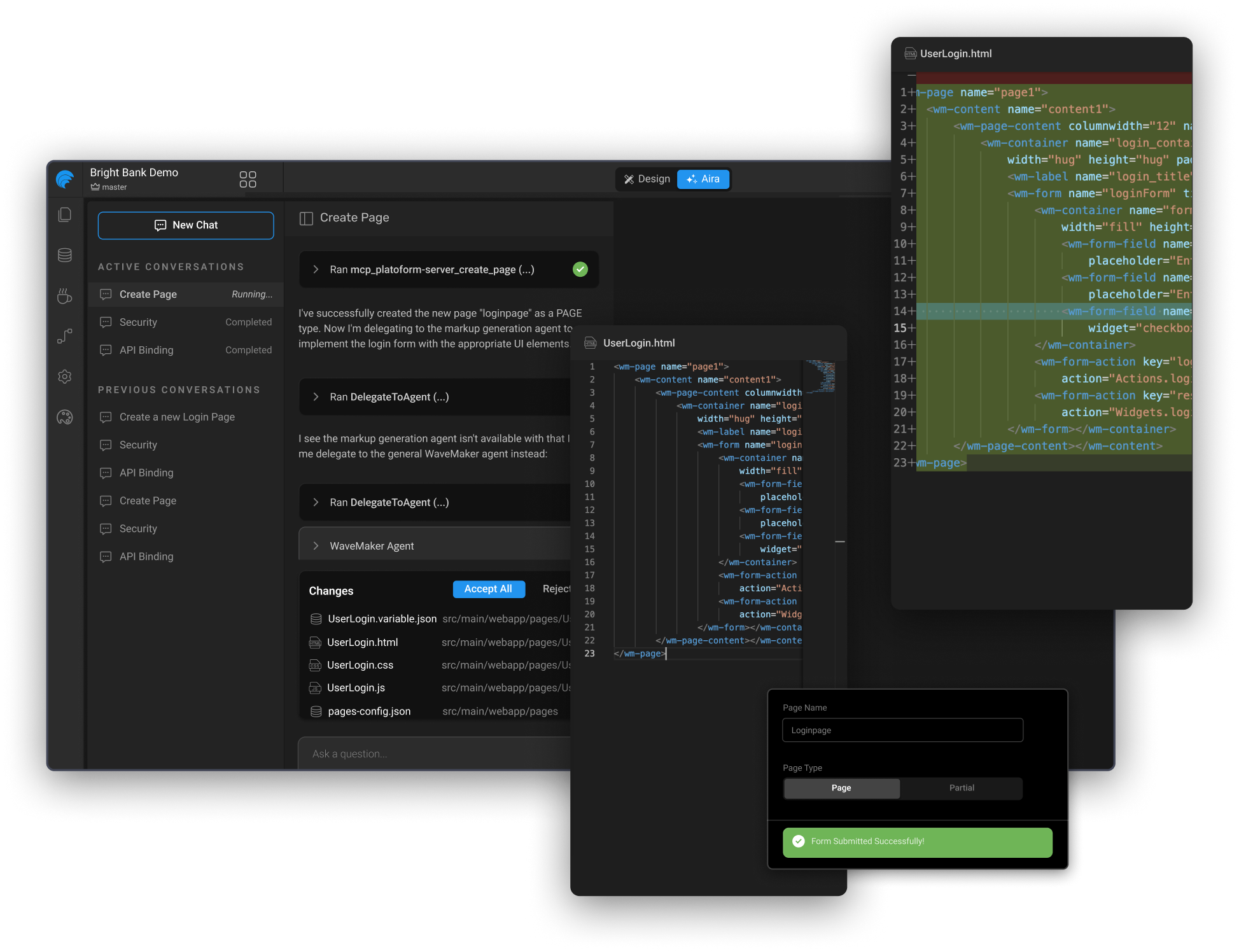
WaveMaker 12: predictable AI for UI-heavy, enterprise-grade app delivery

WaveMaker 12 is built for enterprise app teams delivering modern web and mobile experiences that need to stay coherent as the organization grows.

AI coding tools are everywhere now - and they are genuinely useful. But if you are responsible for shipping UI-heavy, highly customized, secure apps across multiple teams, you have probably hit the same wall:

WaveMaker 12 pairs AI with a standards-driven platform that aligns teams on technology stack, design systems, best practices, reusability, and integration with existing SDLC processes.

What WaveMaker 12 optimizes for

WaveMaker is for teams building multi-platform applications where UI complexity is not a side quest- it is the job:

WaveMaker 12 advances the platform in three areas designed to accelerate large teams:

Three acceleration pillars in WaveMaker 12

1) Design-to-code automation that starts with your Design System

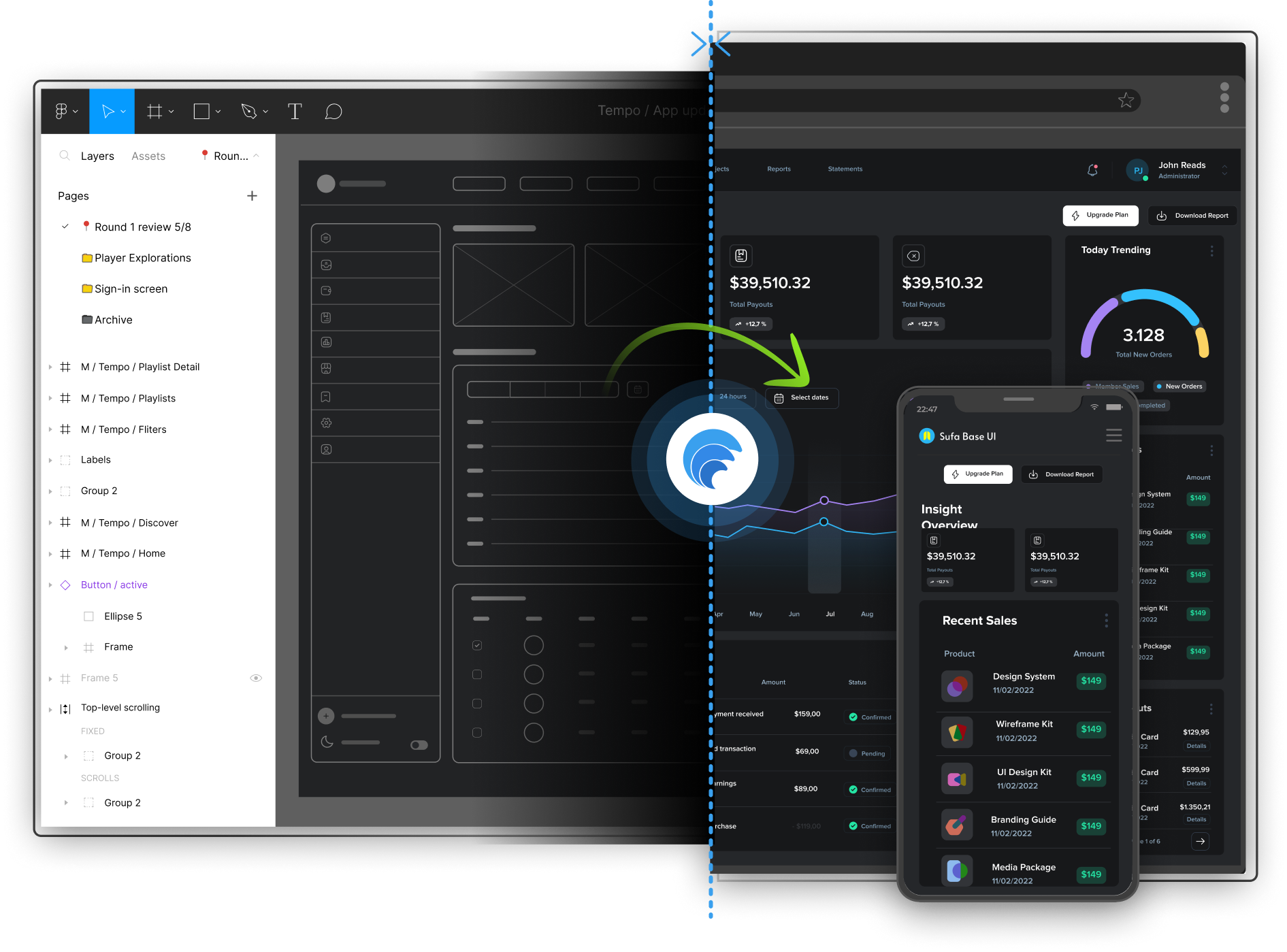
WaveMaker Autocode converts Figma designs into application artifacts using AI by generating a comprehensive set of design tokens mapped to the WaveMaker UI component library.

AI identifies components in Figma and maps them to corresponding WaveMaker UI components. The WaveMaker UI library has evolved to support complex customization, security, accessibility, and modern UI expectations.

Output targets Angular and React for web, and React Native for mobile.

WaveMaker UI Kit is enterprise-grade and built on Material Design principles. By default, components adhere to Material 3, while design tokens allow teams to adapt the look-and-feel to match their own design system.

Why fidelity and reliability improve: the 2-pass technique

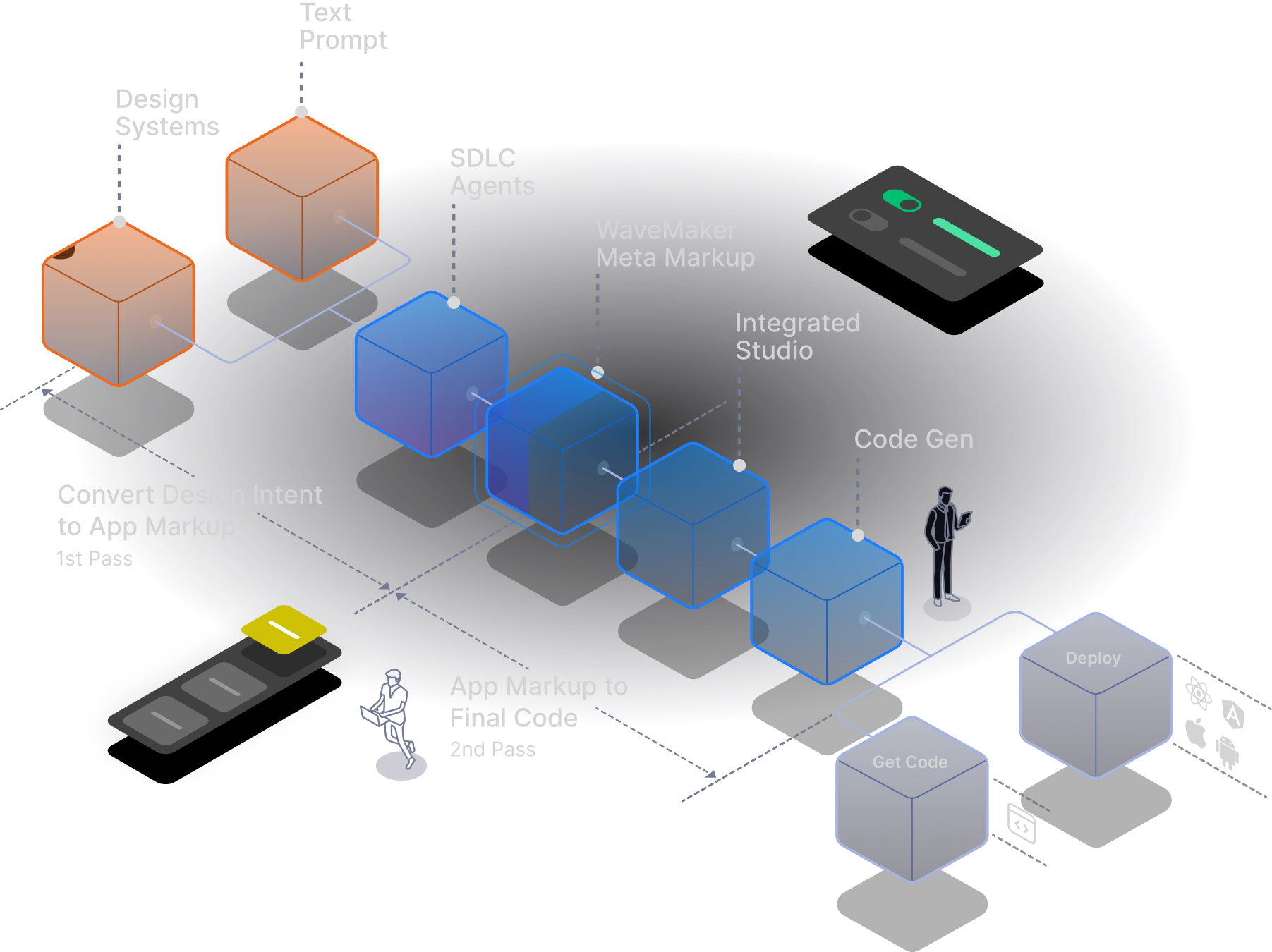
WaveMaker uses a 2-pass generation technique designed to make conversion predictable:

This avoids betting everything on a single one-shot generation. A structured intermediate representation makes the system more controllable, repeatable, and easier to evolve.

2) Developer agents for real app workflows - not just code snippets

WaveMaker AI Agents accelerate workflows while reducing the burden on developers to manage the nuances of underlying UI frameworks, app architecture, or LLM prompting strategies.

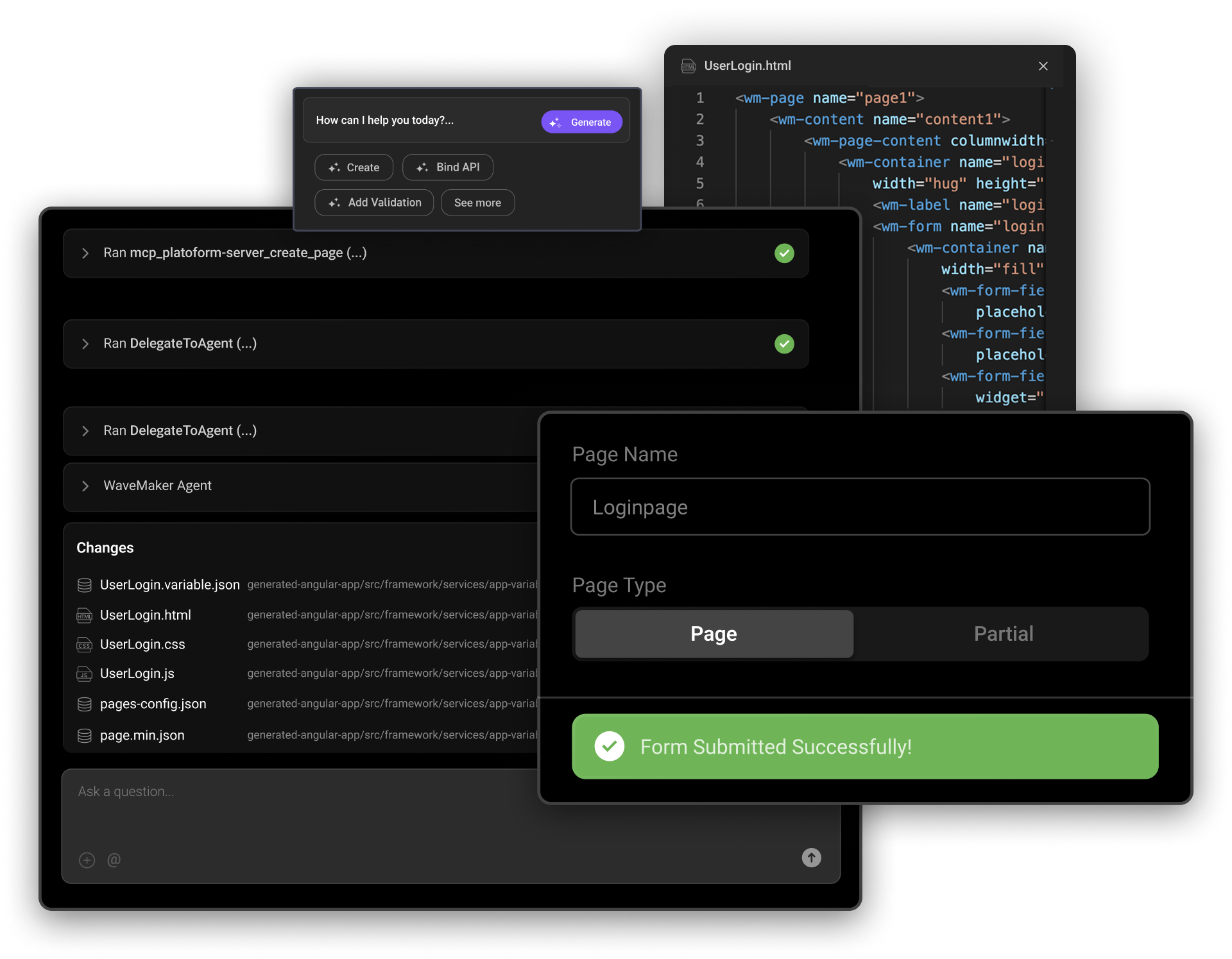
Using plain-language prompts, WaveMaker agents help generate capabilities like:

Predictable output comes from structure, not vibes

WaveMaker agents generate predictable results by using the same 2-pass approach:

WaveMaker also provides a flexible agent framework so organizations can create custom agents tailored to their own use cases, standards, and scenarios.

3) WYSIWYG Studio: human-in-the-loop control that scales across teams

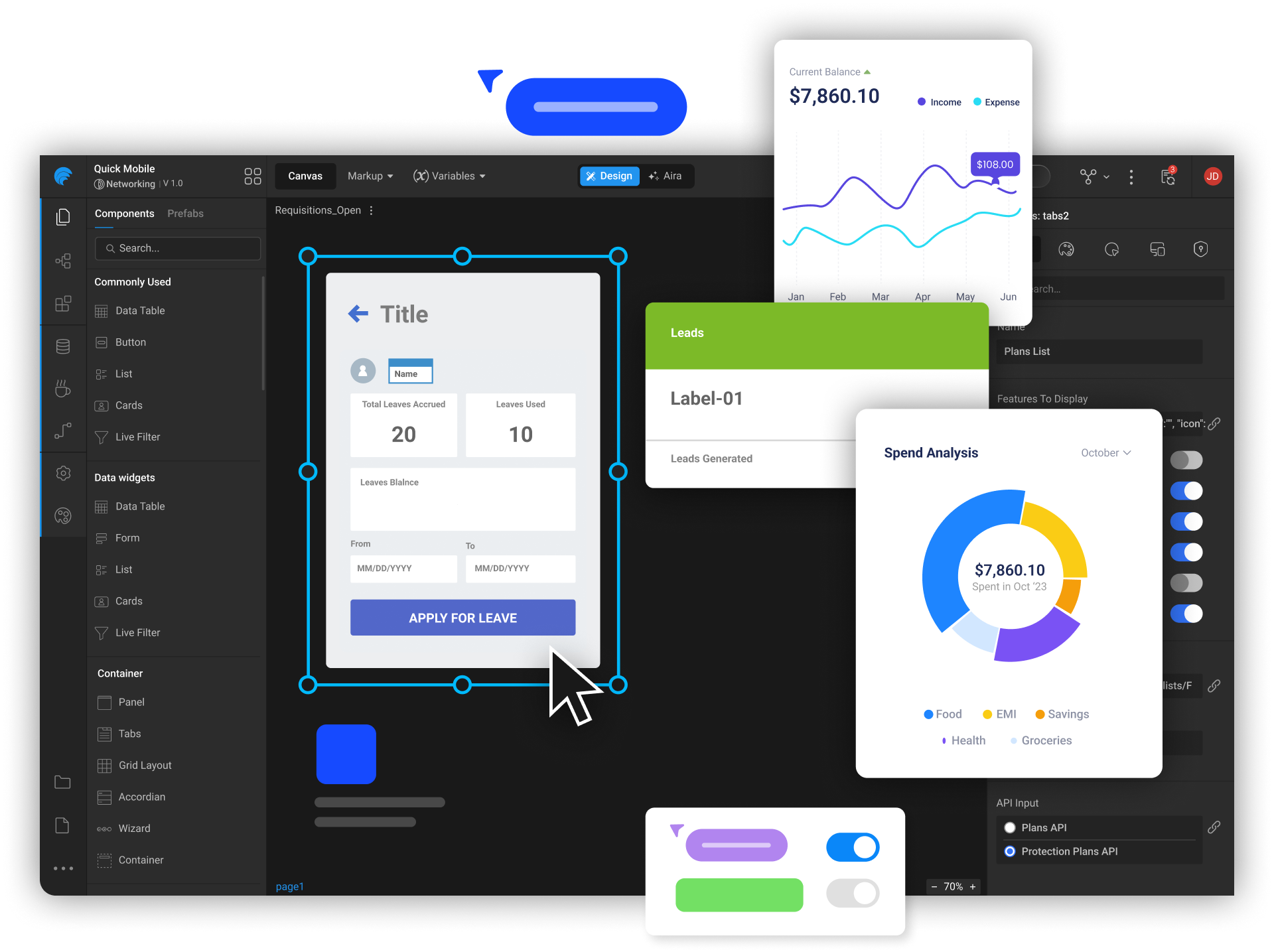
WML does not just help AI generate code - it also powers WaveMaker Studio: visual layout creation, drag-and-drop authoring, and fine-grained control over look-and-feel.

This matters when you are using automation heavily. AI is great at proposing; teams still need a fast way to validate visually, course-correct quickly, and collaborate across stakeholders.

WaveMaker Studio supports a large-team environment with integrations across enterprise tooling, including:

It is a full workflow environment - not a bolt-on chat box.

How WaveMaker 12 stacks up in an AI dev-tool world

Tools like Cursor, Claude Code, Codex, Replit, Cline, Augment Code, and v0 are pushing the space forward. They are excellent at accelerating individual developers and speeding up prototyping and coding loops.

WaveMaker 12 is optimized for a different problem: shipping consistent, design-governed, multi-platform applications across large teams.

Where general-purpose AI coding tools often struggle is where WaveMaker anchors its approach:

If your bottleneck is a single developer coding faster, copilots are great. If your bottleneck is 10 squads shipping coherent UI plus integrations every release, WaveMaker 12 is built for that.

The direction forward: AI is not the product - architecture is

In the AI era, prompt-to-code alone does not solve modern application development. Teams need a stronger foundation in architecture that scales, design principles that enforce consistency, open standards-based output, abstractions that reduce skill bottlenecks, and workflows that fit real enterprise SDLC.

WaveMaker 12 applies AI where it accelerates, structure where it matters, and control where teams need it.


The 2-Pass Compiler Is Back—This Time, It’s Fixing AI Code Gen

How a battle-tested compiler architecture from the ‘70s solves the reliability crisis in LLMgenerated code.

If you came up building software in the ’90s or early 2000s, you remember the visceral satisfaction of determinism. You wrote code. The compiler analyzed it, optimized it, and emitted precisely the machine instructions you expected. Same input, same output. Every single time. There was an engineering rigor to it that shaped how an entire generation thought about building systems.

Then LLMs arrived and, almost overnight, code generation became a stochastic process. Prompt an AI model twice with identical inputs and you’ll get structurally different outputs. Sometimes brilliant, sometimes subtly broken, occasionally hallucinated beyond repair. For quick prototyping that’s fine. For enterprise-grade software—the kind where a misplaced null check costs you a production outage at 2 AM—it’s a non-starter.

We stared at this problem for a while. And then something clicked. It felt familiar, like a pattern we’d encountered before, buried somewhere in our CS fundamentals. Then it hit us: the 2-pass compiler.

A QUICK REFRESHER

Early compilers were single-pass: read source, emit machine code, hope for the best. They were fast but brittle—limited optimization, poor error handling, fragile output. The industry’s answer was the multi-pass compiler, and it fundamentally changed how we build languages. The first pass analyzes, parses, and produces an intermediate representation (IR). The second pass optimizes and generates the final target code. This separation of concerns is what gave us C, C++, Java—and frankly, modern software engineering as we know it.

The analogy to AI code generation is almost eerily direct. Today’s LLM-based tools are, architecturally, single-pass compilers. You feed in a prompt, the model generates code, and you get whatever comes out the other end. The quality ceiling is the model itself. There’s no intermediate analysis, no optimization pass, no structural validation. It’s 1970s compiler design with 2020s marketing.

APPLYING THE 2-PASS MODEL TO AI CODE GEN

Here’s where it gets interesting. What if, instead of asking an LLM to go from prompt to production code in one shot, you split the process into two architecturally distinct passes—just like the compilers that built our industry?

Pass 1 is where the LLM does what LLMs are genuinely good at: understanding intent, decomposing design, and reasoning about structure. The model analyzes the design spec, identifies components, maps APIs, resolves layout semantics—and emits an intermediate representation. Not HTML. Not Angular or React. A well-defined meta-language markup that captures what needs to be built without committing to how.

This is critical. By constraining the LLM’s output to a structured meta-language rather than raw framework code, you eliminate entire categories of failure. The model can’t inject malformed <script> tags if it’s not emitting HTML. It can’t hallucinate nonexistent React hooks if it’s outputting component descriptors. You’ve reduced the stochastic surface area dramatically.

Pass 2 is entirely deterministic. A platform-level code generator—no LLM involved—takes that validated intermediate markup and emits production-grade Angular, React, or React Native code. This is the pass that plugs in battle-tested libraries, enforces security patterns, and applies framework-specific optimizations. Same IR in, same code out. Every time.

First pass gives you speed. Second pass gives you reliability. The separation of concerns is what makes it work.

WHY THIS MATTERS NOW

The advantages of this architecture compound in exactly the ways that matter for enterprise development. The meta-language IR becomes your durable context for iterative development— you’re not re-prompting the LLM from scratch every time you refine a component. Security concerns like script injection and SQL injection are structurally eliminated, not patched after the fact. Hallucinated properties and tokens get caught and stripped at the IR boundary before they ever reach generated code. And because Pass 2 is deterministic, you get reproducible, auditable, deployable output.

If you’ve spent your career building systems where correctness isn’t optional, this should resonate. The industry spent decades learning that single-pass compilation couldn’t produce reliable software at scale. The 2-pass architecture wasn’t just an optimization—it was an engineering philosophy: separate understanding from generation, validate before you emit, and never let a single phase carry the entire burden of correctness.

We’re at the same inflection point with AI code generation right now. The models are powerful. The architecture around them has been naive. The fix isn’t to wait for a smarter model. It’s to apply the engineering discipline we’ve always known, and build systems where stochastic brilliance and deterministic reliability each do what they do best—in the right pass, at the right time.

Deterministic software engineering is cool again. Turns out it never really left.


Vijay Pullur, currently founder/CEO at WaveMaker, pioneered a unique software incubation model under the Pramati umbrella over the last 20 years, creating and exiting innovative software companies to the likes of Accenture, Autodesk, UKG and Progress.

Is AI generated code ready for enterprise adoption?

Developer productivity, adoption & challenges with AI generated code

The growing popularity of vibe coding platforms has led to more LLM usage for code creation, potentially to accelerate app development. The start of 2025 saw a boom in vibe coding platforms, like Loveable, Vercel v0, Bolt, Replit, Kiro, Base44, etc., which simplified developer processes, enabled web app creation, and promised comprehensive app development. However, the quality and consistency of the code generated is highly debated, leading to roadblocks for developer adoption.

The hype!

Anyone can become a programmer

Today, LLMs have evolved to accurately generate programming language syntax, best practices, and well-defined code solutions. Yes, with a well-guided problem statement and appropriate application context, they understand known trends in app architecture and produce meaningful framework code.

Vibe coding platforms produce a lot of code, which is good for bootstrapping an app prototype. But, as you start to iterate and try to make things work, it feels like you are making one step forward and two steps backward (quoted as ‘two steps back pattern’ in the article The 70% problem: Hard truths about AI-assisted coding by Addy Osmani). One needs to be a programmer to review, debug and validate the code generated by these AI code gen tools.

Not all working code is secure and reliable. To validate and accept code suggestions, you need to be a real programmer and that’s the catch!

Complete app development using simple prompts

LLM context window sizes are increasing, evolving to solve large problems and generate considerable portions of apps with layers of complex framework related artifacts, code and dependent libraries. Vibe coding platforms are leveraging these recent LLM improvements to generate entire app scaffolding with business logic to create web apps, based on frameworks like React, Next.js, Node.js, etc.

Vibe coding platforms index and store portions of codebase, so that the vibe coder can express ‘intent’ in plain text (English for now) and the underlying system retrieves and submits these code snippets as context to the LLM for feature generation. This is a very important process and a lot of code and prompt text gets transmitted back and forth between the LLM and the code editor.

Tokens = Syntactical strings ~ (code + prompt text + knowledge base [code examples, tools]) LLMs consume a lot of tokens to generate the code that you desire.

In reality, only simple features gets built with simple prompts and anything complex will need more context and have to go through several iterations. Even after these iterations, chances are high that one needs to end up debugging the code, by askingthe LLM to explain and identify what’s missing!

Super cheap alternative to hiring and building large dev teams

Any complex application development requires a lot of planning, documenting, decisions made regarding architecture, technology stack and developer skillset. LLMs today have matured and are good at automating development tasks such as:

  1. Bootstrapping boiler plate code
  2. Documenting code snippets
  3. Identifying architectural flows
  4. Enforcing coding best practices
  5. Generating well-defined code solutions
  6. Identifying bugs
  7. Generating test cases etc.

However, a team of professionals are needed with in-depth understanding of organization’s needs, domain expertise, ability to understand legacy architectures and appropriate experience to make the right technology and architectural choices. LLMs can only handle automation of certain development tasks only after a strong foundation is laid by experienced developers. Hence, it is not yet viable to build core applications and systems with a bunch of junior developers or non-tech folks assisted by LLMs.

App generation with LLMs today is token frenzy, millions and billions of tokens are needed to build anything practical and it is a very expensive affair at scale! The budgets for large teams are unchecked due to the unpredictable costs and exponential increase as the size of the codebase or the number of developers go up. For a team size of 10-25 developers, monthly AI coding tools alone could cost an additional $75k more per month (as per this article ‘ What a CTO must budget for AI coding tools‘). In reality, both the developer skillset needed and the costs are not dramatically reduced by using AI.

The implications of AI code generation on developer productivity

The unpredictability brought by vibe coding platforms makes it difficult for big organizations and large development teams to adopt AI with the objective of reducing costs or accelerating time to market. However, LLM coding assistance tools like Cursor, Github copilot, Claude Code etc. are well adopted by experienced developers, where they control and govern the output generated by these tools before it is pushed to production.

Coding assistance tools differ from vibe coding platforms in the following aspects, they are:

However, the following are some of the challenges faced by developers who have adopted code assistance tools:

  1. AI hallucinations & non-deterministic output makes developers spend more time debugging
  2. AI generated code is hard to refine through iterations
  3. As the codebase grows, AI makes incomplete suggestions and truncated output
  4. False sense of security and disregard for performance
1. Developers spend more time debugging

One of the challenges with AI is deterministic output and developers are using several mitigation strategies with prompts, context refinement with appropriate code examples, RAG (Retrieval Augmented Generation) based frameworks and guardrails to make the LLM generate consistent output. While some of the development teams who are on a higher maturity curve for AI adoption have figured out these approaches to improve the quality of AI generated code, it is not practical for everyone to adopt and succeed with similar approaches.

A recent report published by harness.io ( Beyond CodeGen: The role of AI in the SDLC), states that 67% of the developers spend more time debugging AI generated code. As this generated code could include outdated dependencies and insecure coding patterns that requires developers to spend more time identifying these problems. While there is initial acceleration, the time it takes to identify and address such problems in AI generated code is a serious setback to developer productivity.

2. Hard to refine AI generated code through iterations

Building a typical code solution in traditional coding approach starts with creating an initial working prototype version and then developers rewrite and refactor this version to adhere to architecture best practices of the organization, security needs, readability and maintainability for upgrades. With AI code generators, developers have a slightly better and faster start, but inevitably they need to iterate with prompts to make it accurate.

AI generates different output in every iterative step making it harder for developers to keep track of changes. Any customizations made previously gets overwritten during iterations, leading to lack of control over code generation. As the feature development progresses and after a few prompt iterations, previously working capabilities could start to fail leading to developer’s frustration and a lot of rework.

3. Inaccurate and incomplete code suggestions

As the size of the codebase increases, the code suggestions are inconsistent for developers to accept. This is largely attributed to limited LLM context window available and developer’s ability to optimize context with approaches leveraging code indexing, other RAG techniques, MCP Servers etc. More compute is needed as the context size increases and LLMs have usage limits and restrictions, resulting in improper output or increased response times.

Today’s LLM architectures, context window and caching techniques are not suitable for large codebases. While MCP (Model Context Protocol) addressed the ability for LLM to retrieve additional context to accurately produce code, it has also increased the complexity around developer tooling.

4. False sense of security and disregard for performance

“A human sees a suspicious URL; an AI sees valid syntax. And that semantic gap becomes a security gap”, by Bruce Schneier - a renowned security expert.

Veracode Gen AI code security report states 45% of the code generated by LLMs have known security flaws, which are identified during vulnerability assessment checks. This is because of the training data on which LLMs are trained i.e. publicly available source repositories and possibly containing vulnerabilities. Another hypothesis is most of the secure implementations and better training examples are not in public repositories and RLHF method for training the models with all possible secure scenarios may not be feasible.

Generating performant code requires deeper understanding and systems-level thinking, which requires a lot more compute. LLMs are as good as their training scenarios and the chances that they are trained on complex use cases and a widespectrum of niche scenarios is unknown. AI report from harness.io hints 52% of the time performance problems are reported in AI generated code.

Conclusion, What’s the road ahead?

AI code gen platforms, AI model providers, tech community and investors are all very bullish about the AI coder dream, but the reality is far from true. While the advancements in LLM technology and the quality of AI generated code is constantly improving over time and becoming adaptable, a human-first approach is needed to build reliable app solutions today.

Developers have to be more cautious with AI generated code and employ more checks and balances in their development environment, such as:

AI code generation platforms need to be more than just glorified prompt wrappers with smart developer interfaces, they need to tackle real challenges in buildingapplication solutions in terms of security, reusability, customizability and scalability. These platforms should focus on reducing the skillset needed to work with AI generated code and enable a human-first approach for developers to stay in control and succeed.

The future of app development is going to be very exciting with mature AI code generation solving skill reduction, time to market and building complex use cases. Development teams will be able to lean towards AI coding platforms to solve technology debt, time taken to address security vulnerabilities and building scalable enterprise-grade solutions with more confidence.

Design-First Sizzle Comes to (Boring) Enterprise Applications

The apps we use at work are finally catching up to the ones we love on our phones. Here's why that matters more than you think.

Something odd has been happening inside large enterprises. The same companies that run multibillion-dollar operations on software that looks like it was last updated during the Bush administration are suddenly rolling out internal tools that wouldn’t look out of place on your iPhone. Dashboards with elegant typography. Onboarding f lows with real delight. Partner portals that make you want to bookmark them. The boring enterprise application — that clunky, soul-draining workhorse of corporate life — is getting a makeover. And the makeover is permanent.

This isn’t a coincidence. It’s a convergence. The consumer mobile revolution trained all of us — every employee, every executive, every customer — to expect software that is intuitive, beautiful, and fast. We swipe through Airbnb listings on Sunday and then open a procurement system on Monday that looks like it was designed by a committeein 1998. The cognitive dissonance became unbearable. And now, thanks to a new generation of design tools and AI-powered platforms, the gap is closing at a speed that would have seemed impossible even three years ago.

Thanks for reading! Subscribe for free to receive new posts and support my work.

The Expectation That Changed Everything

Let’s be honest about what happened. The smartphone didn’t just give us a portable computer — it rewired our expectations for every piece of software we touch. Instagram taught us that interfaces should be frictionless. Uber taught us that complexity can be invisible. Notion and Slack proved that tools built for work could feel just as polished as tools built for play.

That shift in expectation didn’t stay in our personal lives. It walked through the office door. Employees started asking uncomfortable questions: why does the app I use to order lunch feel ten years ahead of the one I use to submit a purchase order? Why does our customer portal look like a relic when our competitor’s looks like it was designed yesterday?

Building products for people to use at work shouldn’t be an excuse for bad design. The distinction between designing for consumer and enterprise has rapidly narrowed.

— Amanda Linden, former Head of Design at Asana

These aren’t trivial complaints. They point to a real business problem. When enterprise tools are ugly, confusing, or inconsistent, employees resist them. Training costs balloon. Support tickets pile up. Adoption stalls. And in a world where digital tools are the primary medium through which work happens, that friction is no longer an inconvenience — it’s a competitive liability.

AI Hands the Enterprise a New Starting Point

Here’s where the story gets interesting. For most of enterprise software history, the design phase was an afterthought. Engineers built the functionality. Then, if the budget allowed, someone applied a coat of visual polish. The result was predictable: capable software that nobody enjoyed using.

That sequence has been inverted. Today, AI-powered tools like Lovable let teams describe an application in plain language and receive a fully functional, consumergrade prototype in minutes — not months. The very first thing a stakeholder sees is a beautiful, interactive, working application. Design is no longer the last coat of paint. It’s the first brick.

95% of Fortune 500 companies use Figma
$749M Figma revenue in 2024 (+48% YoY)
13M+ monthly active users on Figma

And then, in November 2025, something happened that crystallized the trend. ServiceNow and Figma announced a strategic integration that lets teams use a Figma design file as a direct prompt to an AI agent that generates a secure, scalable enterprise application. Not a mockup. Not a prototype. A working application — in minutes. Design intent becomes production code without the traditional handoff that used to dilute quality at every stage.

Figma’s CTO captured it perfectly: in a world of AI-generated software, design is the differentiator that will make your product stand out. When anyone can spin up functional code with a prompt, the thing that separates good from forgettable is taste. Craft. The intentionality of the experience.

Design Systems: The Quiet Infrastructure Revolution

Behind the scenes, a less flashy but equally important transformation is underway. Enterprises are investing in design systems — the component libraries, tokens, and style guidelines that ensure consistency across every screen, every product, and every team. This is the plumbing that makes the polish sustainable.

Figma is at the center of this. Two-thirds of its user base are now non-designers — product managers, engineers, marketers — which tells you something profound about where design is headed. It’s no longer a specialized function sequestered in a creative department. It’s an organizational capability. Headspace reports 20 to 50 percent time savings through design tokens. Swiggy cut feature rollout time in half by tracking design system adoption rigorously.

Here’s the crucial insight: design systems don’t just make software look good — they make the entire development process faster and cheaper. They reduce duplicated work across teams, enforce brand consistency without manual policing, and provide the constraint set that AI tools need to generate on-brand interfaces automatically. Design infrastructure is becoming as essential as cloud infrastructure.

Design as the Signal, Not the Garnish

There’s a deeper strategic play here that goes beyond efficiency metrics. Enterprises are discovering that the design quality of their software sends a powerful signal — to employees, customers, suppliers, and partners — about who they are and where they’re headed.

Think about it this way. When a company deploys a beautifully designed internal tool, it tells employees: we value your daily experience. When a customer logs into a partner portal that feels as refined as the best consumer apps, it tells them: we are modern,competent, and invested in this relationship. When a supplier interacts with a procurement platform that is actually pleasant to use, it tells them: we operate at a different level.

Companies undergoing brand transformations or strategic pivots are increasingly leading with design. Not with press releases or ad campaigns — with the actual digital products that stakeholders touch every day. A redesigned enterprise application isn’t just a better tool. It’s a statement of intent.

In a competitive market, polished enterprise tools signal a business values its stakeholders, whether they are customers or partners or employees. Clunky, outdated applications signal stagnation. Design has become an unspoken part of stakeholder branding.

Where This Goes Next

The trajectory is clear. Enterprise applications will continue converging with consumer-grade quality, driven by three forces that are only accelerating.

First, AI will get better at generating interfaces that are not just functional but genuinely thoughtful — pulling from organizational design systems to produce screens that feel crafted, not generated. Second, the tools that bridge design and engineering will keep tightening. The ServiceNow-Figma integration is just the opening act; expect every major enterprise platform to build similar pipelines. Third, the people building enterprise software are changing. When two-thirds of your design platform’s users aren’t designers, the cultural expectation shifts: everyone becomes a stakeholder in experience quality.

$626B projected enterprise app market by 2030
34% faster task completion with design systems
50% rollout time cut at Swiggy via design tracking

The global enterprise application market is projected to nearly double by 2030, growing from $320 billion to $626 billion. Within that expanding arena, the organizations that treat design as a strategic priority — not an aesthetic afterthought — will build software that people choose to use, not software people are compelled to endure.

The boring enterprise application had a good run. For decades, it traded on necessity: employees used it because they had to, not because they wanted to. That era is ending. The tools exist. The expectations are set. The business case is proven. The only question left is whether your organization will lead this shift — or be the one whose software still feels like 2008 while the competition looks like 2028.

Design-first isn’t a trend. It’s the new minimum.

Sources referenced include ServiceNow-Figma collaboration announcement (Nov 2025), Figma IPO disclosures and growth metrics (Q1 2025), Figma 2025 AI Report, enterprise application market analysis (Grand View Research), and UX Magazine research on consumer-enterprise design convergence.

Thanks for reading! Subscribe for free to receive new posts and support my work.

Can AI improve the iterative developer experience?

Prasanth Reddy

Welcome to this episode of WaveLength, where we discuss trends, opinions, and goings-on in the space where enterprise software developers lurk. WaveMaker combines open standards, component architecture, and low code technologies to offer enterprise software developers a high-productivity, high-speed platform for custom software implementations. With AI added to the mix, there are many opinions on how it can sharpen our focus even more on improving the iterative developer experience in custom software implementations. We spoke to Prasanth Reddy, senior director of product management, on what he thinks WaveMaker should do next.

WaveMaker: We have always been in the business of reducing the grunt work involved in writing software applications. Isn’t all this AI buzz more of the same?

Prasanth Reddy: Reducing grunt work is an outcome. AI is really about increasing the level of abstraction. If you consider abstraction a ladder, WaveMaker’s existing widget library is the first rung. What we are doing with AI is moving up the ladder of abstraction. This is a way we hope to get closer to the intent in the user’s mind and convert that into working WaveMaker app code.

So what I’m telling users is: don’t think about tables and lists anymore. Think about what you want to build. You want a leave management app with the usual approvals, privileges, the leaves you can take, and so on, with some analytics thrown in. Where do you start if not from some boxes and arrows on the whiteboard?

WM: We can take the abstraction higher than just canned interaction components and workflows, is what you are saying.

PR: Yes. So, AI has taken the abstraction level further up. And that is where we are now with using it in low code. We leverage LLMs (large language models) to convert that intent into working code. It also means we find the right LLMs to use, right?

Our philosophy has always been moving the abstraction level up so people (developers) become more productive. With AI, we are moving even further into layers where users directly interface using their spoken language with a generic platform. We are not thinking of vertical solutions for finance or healthcare – many products do that – of providing a way for users to build their abstractions in prefabs (called packaged business components by some analysts).

WM: Products like Unqork and Temenos are domain-specific and are also abstracting. How is our approach different from a product with a domain model built in?

PR: Yeah, our approach has always been that we will be a generic product that enhances the productivity of ANY developer. It allows them to create their own abstractions. At the same time, a vertical product leans into a particular area and has entirely converted its product to address only those features that are relevant in, say finance, industry. Even the way the product is marketed and sold, all of that adds up to that vision. Our vision is more on increasing generic developer productivity.

WM: Having a domain model may clarify how AI can be used. WaveMaker aims to simplify life for professional developers, for whom higher-level abstractions are essentially use-case scenarios or specifications. But these are a wide variety and non-specific. How does this pan out for WaveMaker?

PR: Our strength has always been our user base of professional developers. We understand them well. We belong to the same tribe. We are now trying to swim upstream to expand our total addressable market by getting business analysts and designers onto the platform. After all, innovation does not happen in isolation, it happens at the point of interaction. The more meaningful we make that interaction, the higher the chances of closing the intent-to-code gap.

WM: Ah, this is really about team, not individual, productivity.

PR: I must state this here: this is not just about the productivity of individual developers but whole teams. Whether they are Figma users designing wireframes or business analysts writing specifications, the iteration with core developers is still very long and frustrating and riddled with losses in translation.

This is because of how abstractions have been set up in WaveMaker at the widget level. With AI, we are breaking through to a higher level of abstraction, opening our product out to more people but at the same time keeping the interaction with core developers meaningful. That’s when we feel we enable whole teams to become productive, not just individual developers. We expect this to result in unprecedented iteration velocity.

The iteration cycle between teams – whether designers and developers or business analysts and developers – the time it takes for the iteration to complete determines the time to market.

WM: Why AI? After all, the low code mantra has always been about abstraction, acceleration, and productivity.

PR: We couldn’t have done it at a generic level without AI. We would have had to pivot and choose a few domains and just completely lean into it. But now, we think we can achieve higher-level abstractions and continue taking a more horizontal approach – precisely what AI enables.

WM: You can go wide and deep at the same time.

PR: Yes, absolutely. And we are uniquely positioned because we already have a product that allows customers to develop their own abstractions. And now we have an AI play with ChatGPT (and similar) that is voraciously feeding on all kinds of data. We’re perfectly placed to put these two together and create a generic product that at once addresses a large amount of surface area. So that’s what I meant when I said “converting intent to code.

WM: Will we implement this as a one-pass activity that gives users a headstart? Or is it going to be with them through the lifecycle-that is, actually complete roundtrips?

PR: Well, even if you take a single iteration, AI involvement is getting more done because there is less lost in translation. This is particularly impactful when each feature is in a different sprint. We have seen this when working with ISV product teams on low code. To me, with every iteration, more gets done, there is less frustration less chasing of bugs, and higher chances of being pixel-perfect.

Today, when you look at iterations that involve hand-offs among business analysts, designers, and front-end developers, there is a loss in the quality of code output. This generates a long list of bugs, which generates grunt work, which burdens the team and affects their code quality. We have to break this cycle.

Reality is nobody wants to manage a list of issues or prioritise because that is the real grunt work. Everyone is talking about grunt work in coding, but the work that people actually hate is prioritising, maintaining lists, allocating work, who gets to do what, etc. If we reduce this, we will achieve a lot. We reduce management overheads and focus on real work.

WM: Our first step is to build a WaveMaker component plugin for Figma users. Will the approach hold when we open up to all of Figma? Will it be too wild to guarantee 99% accurate app code?

PR: The two worlds of designers and developers are different. The semantics are different. The developer side of the equation is more deterministic and syntax-driven, while the designer side – yes, they follow a process but is largely heuristic and imaginative. There is variety. But you really don’t need to be 99% accurate in the translation because our strength is our low code editor, where code can be fine-tuned or corrected easily. Even if I give you a leave management app with a table and you want a list, it can be easily changed on our studio’s canvas. Having said that, we have some guardrails.

WW: Round-trips will be cool, right?

PR: Though it will be cool to round-trip, I am skeptical about that. We need to think more. The customers we deal with do not want to subsume the designer’s role and play at the edge of user experience. They have teams that are dedicated to doing these things. Also, ideation and implementation happen in two different parts of the organisation. They do not want to short-circuit that. Not yet.

Actually, you should not be asking me about round trips. The question we should ask is: What happens if you shorten the iteration cycle and our tool lets you do eight iterations instead of four in the same given month? That’s more than acceleration. That’s the compounding of gains and value you’re building on top of what you already did. This brings immediate and real benefits to team productivity, not just unlocking an individual’s potential to round-trip

WM: That’s what WaveMaker AI’s goal is: help multi-disciplinary teams unlock their potential.

PR: Yes, because right now, WaveMaker is really designed for individual developers. Of course, teams using WaveMaker see overall productivity gains because of component reuse, templates, drag-n-drop interface, etc. But the real unlocking of value will happen when you’re able to bring in teams that are currently working together but are outside WaveMaker.

WM: Finally, do you think this constant demand for speed is tenable?

PR: Yes, the human potential is unlimited. It is the “iteration cycle to value” that constrains the speed. If you don’t see value, you won’t be interested. This has been the thing since the Industrial Revolution when groups of people worked together, and they just got better at working together. They got faster at creating something because they could, like I said, iterate and create value quickly.

WM: In the low code world, what’s the bottleneck for speed?

PR: There could be more than one. But the “Design to Code gap” is where we are at now. There are also compliance guidelines. Did you do the right thing by security? Did you do the right thing by accessibility? Answers to questions like that mean various guardrails have to be put in place when a project is being coded. So that in the end, you don’t pay the tax. But unlike design, these are deterministic and easy to set rules for.

WM: Assuming most want cookie-cutter UI, especially mobile, and my LLM model is well-trained on a million files, will iterations go away eventually?

PR: That’s difficult to imagine, though AI gets better at second-guessing as it evolves. But people still would want to iterate because it is a way to clarify what their intent is. There is a bit of wandering in all creative processes, which is never straight. “Design to code” iterations are how teams can meander, discover and pivot their way to an end product.

Coding up something and getting it to work is an intense process that does not leave a lot of time and mind space for more ideation. There is also resistance that grows to making changes after something is implemented. Having a designer role that is protected from this, with a bit of freedom, is a good thing to have in the team.

WM: While AI becomes better and better at second-guessing what users do and what they want, what lies ahead for WaveMaker?

PR: The key is how we work the abstraction ladder we spoke about in the beginning. Yes, in the shallow end of the pool, AI will democratize access to creating cookie-cutter apps. You may also have a GPT-powered phone that does everything and anything for you. Yeah, that could be one outcome. But in the deep end of the pool of developers, teams will continue to look for ways to deliver value with faster and more productive iterations. There is always room for providing more value. That’s where we dive in.

W: Thank you, Prasanth. That was an illuminating session of WaveLength.

The Future of WaveMaker in AI

Deepak Anupalli & Prashanth Reddy

Welcome to this episode of WaveLength. Who is not talking about AI today. If you are not working on it today, it’s surely on your roadmap. And if it’s not on your roadmap, it’s surely on your mind. So it was for us in WaveMaker too. The possibilities of using AI to make imagination a reality and what it means for low code have been on our minds. But they are endless. So we put our heads together and distilled it down to a few challenges that we think are stopping low code from realising its full potential.

One of them is the effort it takes to convert an idea or intent into working code for enterprise software. The intent is best expressed not as words but as pictures. We started by finding a way to convert Figma (just because it’s popular) files into a working app in a single click (complete with mock API signatures and data). It’s not perfect but it resonates with early-bird users and has shown us that we are on the right path. Our goal is to give users pixel-perfect UI with the continued acceleration of low code and a strong foundation of open standards. This is central to WaveMaker’s AI roadmap. We decided to sit down with Prashanth Reddy, Senior Director of Product Management and Deepak Anupalli, Chief Technology Officer and Co-founder of WaveMaker, to shoot the breeze and find out their rationale for using AI this way.

WaveMaker: Prasanth, let’s start with how app development is generally evolving with AI and how AI is influencing developers. And, of course, where WaveMaker fits into all of this.

Prasanth Reddy: I would say we already know that “generative AI” is generating code, right? Everybody is saying, you know, when Microsoft Word arrived, all the typists employed in enterprises just got fired and their jobs went away. So, because AI is generating code, the programmer’s job will also go away eventually, and with it, no code will also die. This is what people are thinking. I am generalising here for a reason. A lot of people who have seen technology demos think that way. But take custom or any application creation. It differs from just generating code for spooling out prime numbers, which is basically a single function. But we know that application creation goes through iterations, and different people collaborate, right? So there are people from the design team, there are people from the programming team. This is how enterprises work. The IT team is not in charge of ideating and creating designs. There will be a team that is ideating and creating designs, and then someone else makes a decision to take it to market.

So AI is all fine, but if you want to really adopt it within your enterprise, within your existing workflow of creating applications, you need a platform that allows existing teams to play well, and that is what AutoCode lets you do. Custom application creation needs iterations. You don’t know everything up-front. You only have a sketchy idea of what you want to build, and what you want to take to customers ultimately may change as you go. You simply don’t have all the information. So first, you create something and implement it with, say, WaveMaker, and then iterate. That’s how things get done.

Deepak Anupalli: So yeah, with this approach, Prasanth, are you indicating that one knows why one needs a low code platform, that is to basically quickly put the pieces together, but now using AI? Is that what we are trying to do? Or are you saying that, okay, in the AI world you get some code but now how do you use this code, together with other bits of code, to create an application? That’s my first point. Two, now that you have assembled something, how do you iterate, how do you make enhancements? Whenever you make a change, a new piece of code is generated. How do you handle that?

WaveMaker: I think that is true, right? Maybe AI is not there yet in terms of providing you with a whole application, because an application is somehow not the sum of its parts, right? Yes, you can generate bits and pieces, but really putting it together and giving an experience? We probably are not there yet, are we?

PR: Yeah, for custom application development, the best expression of what you want to develop, the intent of what you want to develop, is a design. It can never be expressed as a spec. The whole ideation process, all the whiteboarding and everything, ends up as an artifact, which is a design.

WM: I agree but even before a picture, there are words describing the intent. There are discussions, there are sticky notes. Text prompts in a way.

PR: But at the end of it, there is an artifact that captures the intent, and that is not text, it is a visual. A picture speaks more than words, to use the cliche. So the information bandwidth that is communicated with a picture is much wider than anything you can do with text. So we are not simply what is possible with AI, instead what we are saying is that low code with generative AI gives you the ability to create custom applications faster using your existing teams, the way they are laid out, and your existing application architecture.

WM: So customers don’t have to change anything to start using AI?

PR: Yeah, if you leave out a certain upper echelon of programmers – I challenge any typical enterprise IT or programming team working on custom app projects to have the agency and bandwidth to create and implement ideas. Most are “Okay, tell me what to do,” right? And that’s where most of the custom application projects need attention.

WM: Isn’t that what low code had set out to do? A level playing ground among software developers, the democratisation of software development?

DA: No, wait. I think we are generalising too much here. Look at the different segments of applications. What does general low code target? If you take typical citizen developers and business users, most want to automate routine tasks and execute faster. Naturally, many low code platforms indeed make it easier to automate daily work. They focus less on design and more on automation because they were helping users who really didn’t want to go through piles of data and multiple screens to make decisions, but instead wanted to build an app that does it for them.

PR: So that is workflow automation that you’re talking about. I think AI will consume workflow automation. In that space, one actually knows what one wants to build as the process is known ahead. AI can eat that lunch. But we are not caterers of that lunch.

DA: Yes, custom applications are where we are focused. It is important when we say building custom applications, we are assuming a well-defined design is available for it. But we are not talking about iterating the design. Yes, you are building a custom application but you are not creating a new design. Neither are you revising the existing design in your iterations, moving buttons around, changing an interaction design of a widget or whatever. So given a UX design, we have an AI way of arriving at a real working application. That’s what we are doing here.

PR: Both from a marketing point of view as well in terms of actual product offering, we do not have to necessarily stick to custom application development, though that’s the target use case. In general, WaveMaker is now AI-powered, inside out. It can not only convert working designs into working applications really quickly. You can further keep working on the code we generate – it’s open standards and all that. With Co-pilot and other AI, you either have to accept or rewrite the code that’s generated. You know you can’t really work on improving that. Whereas with WaveMaker, we use AI to generate code but also give you a Studio where you can continue to tinker and continue to refine the code.

DA: I think this is where there will be value in WaveMaker, Prasanth. Typically iterative development is where you have people writing code and also modifying it, repeatedly. While AI gives you a higher ground to kickstart your app creation process, low code makes it easier and faster to iterate. The big plus is the visual interaction model of the Studio which offers an intuitive way to fine-tune the experience – or refine the code.

PR: Yes. The code refinement process is frustrating with prompt interactions currently raging in AI. Nobody knows how to write the exact prompt, and the process of seeking it can be a long one.

DA: Currently, AI is a great start because it has the potential to take you from what you have imagined – your intent – to close to a real application very fast.

WM: Is it true that the flipside of the great start is that depending on how you write your prompts, it can expand the problem set rather than converge on the solution? While this may be good for research and ideation, it is not ideal in a production scenario.

DA: That’s true.

PR: See that’s why the expression of intent is best done with the visual design and not a prompt that nobody knows how to write. You may need to be a Linux command-line expert to grok that kind of thing.

WM: Even that may change. Thanks, Prasanth and Deepak, for another episode of WaveLength. Everything is pivoting faster than one can say pivot, so we must meet again and continue to discuss how AI-infused low code changing developer experience in enterprise app development.

The Crucial Dance: Enhancing Designer- Developer Collaboration for Exceptional Products

Kuldeep Chandel

Within the world of digital-product development, the collaboration that exists between UX designers and developers is a dance. When this dance flows smoothly and harmoniously, the result is a masterpiece-an exceptional product that delights users and drives business success. However, when this vital collaboration falters, this dance becomes disjointed, leading to missed steps, frustrations, and ultimately, a product that fails to meet expectations.

The Business Imperative for Designer-Developer Collaboration

Smooth collaboration between UX designers and developers is a must-have for business success. Designers focus on the user experience, workflows, aesthetics, usability, and accessibility, crafting products that not only look great but also work flawlessly. Engineers, on the other hand, focus on what is possible and where they can push the limits of technology, ensuring design solutions that are both feasible and efficient.

When the two disciplines of UX design and development collaborate closely, the result is a product that not only meets but exceeds users’ expectations. This holistic approach to product development leads to higher user satisfaction, increased customer loyalty, and a healthier bottom line. By bridging the gap between UX design and development, teams can create products that look amazing, function seamlessly, deliver exceptional user experiences, and drive business success.

The Cost of Poor Collaboration

When designer-developer collaboration falters, the negative impacts can be severe. Miscommunications, conflicting priorities, and a lack of role clarity can result in delays, cost overruns, and, most importantly, a product that fails to meet users’ needs. One common issue when UX designers and developers fail to communicate effectively is that requirements get lost in translation. Picture this: UX designers are envisioning one thing, while developers interpret their designs differently, and chaos ensues. This mismatch leads to confusion, unnecessary rework, and a frustrating cycle of revisions.

Teams that don’t establish a united front on goals and requirements can get stuck in an endless loop of revisions, causing project timelines to spiral out of control. Then, when collaboration breaks down and people start playing the blame game, the project really suffers because the result is a toxic work environment, which is the last thing anyone needs.

Barriers to Effective Collaboration

Achieving effective collaboration between UX designers and developers is no easy feat. Several common barriers can hinder designer-developer collaboration.

Different Working and Communication Styles

One barrier to effective collaboration between designers and developers is their different working styles. UX designers and developers speak different languages. Designers are fluent in the language of creativity, aesthetics, and user experience, while developers are fluent in the language of logic, algorithms, and technical implementation. Their different languages can lead to misinterpretations and misunderstandings between them.

To overcome this barrier, teams need to become bilingual. Designers and developers must learn each other’s languages. This involves fostering a culture of empathy and open communication in which both try to understand and appreciate the other’s perspective. By becoming bilingual, teams can achieve seamless collaboration and create products that are both beautiful and functional.

The Handoff Process

Another significant barrier lies in their handoff process. In many companies, product managers and UX designers take the lead in defining requirements and creating product designs, but developers are essential for bringing their creations to life. After all, users interact with the final, functional product, not a product requirements documents (PRD) or prototype. When UX designers pass their designs to developers for implementation, the handoff process can lead to problems.

When UX designers work in isolation from developers, neither has the full context. This lack of context can result in development constraints and overlooked edge cases that the designer hasn’t considered. The issue is not just with the handoff process itself but also with the mindset behind it. Effective collaboration requires UX designers and developers to work hand in hand throughout the entire product-development process. This means involving developers early on, during the design phase, to ensure that everyone is on the same page and that the final product meets both design and technical requirements.

Strategies for Improving Collaboration

While achieving effective collaboration between UX designers and developers can be challenging, it is not impossible. By fostering a mindset shift and leveraging technical tools, teams can overcome these barriers and achieve seamless collaboration.

The Mindset Shift

Despite sharing the same end goal, UX designers and developers all too often operate in silos, with designers working independently, then handing off their designs to developers. This lack of collaboration can lead to developers’ prioritizing technical implementation over design details or adopting a not-my-job mentality. Effective designer-developer collaboration should span the entire lifecycle of feature or product design and development rather than being limited to the design-handover stage.

When both UX designers and developers communicate a clear why, this fosters alignment and creativity within the team. Therefore, it is crucial to involve developers early in the process, starting with the definition of the problem space. Taking this approach helps the entire team collectively develop a shared understanding of the problem at hand and empathy for one another.

Simply asking developers to implement a designed screen overlooks the importance of their understanding the problem space. This approach is limiting because it encourages their focusing solely on the solution. When developers care too much about a particular solution, they tend to stick to it. Then it becomes too brittle for potential future development. Developers’ caring just as much about the problem space as the solution is crucial to ensuring flexibility and adaptability in the development process.

The Design System

Developing a design system is one key to enhancing collaboration between UX designers and developers. A design system serves as a central repository for design assets such as UI components, styles, and patterns. These assets provide a shared language and tools, bridge the gap between the two disciplines, and enable more effective collaboration.

The aim of creating a design system is reduce confusion, speed up prioritization, facilitate the planning of roadmaps, and increase the team’s efficiency and velocity. By enabling UX designers to quickly create prototypes from prebuilt components and enabling developers to easily implement designs using the corresponding code components, design systems streamline the collaboration process. They also foster a culture of reuse and iteration, enabling both designers and developers to contribute and improve components based on their teammates’ feedback, strengthening collaboration, and improving the overall quality of the system.

AI-Powered Design and Development

AI is revolutionizing the collaboration between UX designers and developers, particularly within these realms:

Design-to-Code Conversion

The traditional handoff between UX designers and developers has long been a bottleneck, often resulting in time-consuming, error-prone translations of designs into code. AI is revolutionizing this process by automating aspects of the design-to-code journey.

By leveraging machine-learning (ML) algorithms, AI tools can analyze design files and produce code snippets that closely resemble the original design. It is crucial that the AI-generated code respects the design-system components and accurately represents these abstractions in code. This alignment ensures that the code AI generates is consistent with the established design system, observes design standards, and is consistent.

This automation not only speeds up development but also guarantees a higher degree of harmony between the design and the final product. The resulting reduction in manual effort also enhances the team’s overall efficiency, benefiting both UX designers and developers.

Design Implementation-Difference Detection

Maintaining design consistency and quality requires meticulous attention to detail, especially when detecting the differences between designs and implemented code. Advanced AI-powered image comparison tools have streamlined this process, offering a more efficient and accurate alternative to manual inspection.

These AI tools meticulously analyze design mockups and implemented user interfaces, pixel by pixel, swiftly identifying any discrepancies. By leveraging AI for design implementation-difference detection, teams can ensure that the final product aligns closely with the original design and delivers a polished, consistent user experience.

Moreover, AI’s role extends to ensuring accessibility compliance and flagging potential issues such low color contrast and inadequate text sizes early during the design phase. This proactive approach enables designers and developers to make the necessary adjustments, ensuring that the final product is accessible to all users.

AI-powered tools present a new frontier in enhancing collaboration between UX designers and developers. By automating tedious tasks and offering insights that improve efficiency and accuracy, AI is reshaping the design-to-development process, leading to better outcomes and more seamless collaboration.

Conclusion

The quality of a team’s work reflects its alignment with the specific context and goals that were established in a project’s requirements. If we focus solely on the designer experience and overlook the needs and perspectives of engineers, we not only risk creating inefficiencies, delays, and inconsistencies but also compromising the quality of the overall product.

Effective designer-developer collaboration is essential to delivering truly exceptional products. By recognizing the importance of this collaboration, understanding the barriers that can hinder it, and implementing strategies to overcome them, teams can achieve seamless collaboration and deliver products that both delight users and drive business success. So let’s embrace this collaborative dance and create products that truly shine in the eyes of users and win in the marketplace.

A Developer’s Guide to Design Systems

Pronoy Roy

In any application development project, designers and developers often find themselves in a constant back-and-forth, striving to meet launch deadlines. While tools like Figma and Storybook have improved the hand-off between these teams, they are primarily geared towards speeding up development. Though these tools also benefit designers by providing measurable guidelines, the real challenge lies in maintaining those guidelines effectively.

The only way to standardize designer-developer handoffs and to make sure people agree on the processes is by having a design system that has been designed by designers and then implemented as a design system in their development framework by developers.

This is where design systems come into play, filling the gap that often exists between design and development. By adopting the development approach of reusability, design systems offer a structured way for designers to define the limits and scope of a project. Utilizing design tokens and variables, they significantly reduce decision fatigue for both designers and developers, leading to more efficient and cohesive workflows.

For developers, understanding design systems isn’t just about knowing the tools – it’s about comprehending the concept and applying it to enhance their development processes. The foundation of any design system rests on four central pillars:

Understanding and implementing these pillars in your development workflow leads to a more efficient and standardized process. Developers no longer need to worry about creating everything from scratch-instead, they focus on how to best utilize the existing components and styles to achieve the desired outcome.

This guide is not just for designers or developers; it’s for any team looking to improve collaboration and streamline their design and development processes. Whether you’re starting from scratch or looking to refine your current approach, the concepts discussed here can serve as a valuable framework for building your design system.

To dive deeper into each pillar and see practical examples of how they can be applied, read the full blog here.

The AI-Augmented Designer: Navigating the Future of UX Design

Kuldeep Chandel

Picture this: You’re starting a new app-design project, and instead of initially staring at a blank screen, you have AI tools at your behest that can generate wireframes that are tailored to your project’s requirements. These layouts aren’t random-they’re based on your users’ data, tailored to users’ preferences, and aligned with what’s working within your industry domain right now. Throughout your design process, an AI can suggest real-time tweaks that are based on user-behavior patterns, helping you refine a product’s design at lightning speed.

This isn’t some distant future-it’s happening now. AI is fast becoming a UX designer’s best teammate, helping us work faster, think smarter, and create more meaningful user experiences.

A Shift in Focus: From Tools to Strategy

Since the advent of the UX design discipline, our success has hinged on mastering technical tools such as Photoshop, Illustrator, InDesign, or Axure-or more recently, Sketch or Figma. UX designers have spent years perfecting their ability to manipulate pixels and craft visual details. But the world of UX design is quickly evolving, and with AI’s rise, UX designers must now focus on more strategic elements such as user psychology, behavioral economics, and data analytics.

Instead of laboring over every visual-design detail, UX designers now have a skilled AI assistant to handle the manual tasks, letting us focus on the overall architecture and design vision.

Tip: To adapt to this shift in our design approach, UX designers should focus on learning how to interpret data and analyze the reasons behind users’ actions. More importantly, they must translate these insights into human-centered designs. While AI enhances efficiency by processing vast amounts of data, the UX designer’s role is to understand the context behind the insights. Only in this way can we ensure that every design decision we make genuinely serves users, addressing their needs, understanding their behaviors, and crafting experiences that users can connect with on a personal and meaningful level.

AI as a Creative Co-Pilot

I want to address a common concern right off the bat: AI is not here to take over our jobs. Instead, it acts as a creative co-pilot, augmenting our abilities and helping us to speed up the process and make better design decisions.

I remember the first time I used Framer AI to build a Web site. It didn’t just churn out random designs, but created user-interface (UI) layouts that felt purposeful-as if someone who deeply understood the user journey had crafted them. While the time I saved was a great benefit, what really struck me was how the AI’s suggestions helped me see new possibilities.

By analyzing user behaviors, AI tools can predict user interactions and suggest design tweaks. Thus, they can automate repetitive tasks, allowing us to focus on more complex, strategic decisions. While you’re still guiding the ship, the AI helps you navigate the waters more efficiently.

Actionable Insight: Start small. Use AI tools for routine tasks such as generating design ideas, writing copy, or organizing design components. Once you’re more comfortable with AI, explore how AI tools can support more strategic tasks such as predicting user flows or making data-driven design adjustments. Let the AI handle the repetitive tasks, so you can focus on refining and enhancing the user’s overall experience.

Practical Applications of AI in UX Design

AI’s impacts on UX design are already tangible. Let’s consider some concrete ways in which AI is shaping the future of UX design such as the following:

A friend of mine was working on a retail Web-site optimization project. Initially, accessibility hadn’t really been factored into the design. Later on, they realized they had to meet compliance standards, which meant going back and redoing large parts of the Web site-a lot of extra work they hadn’t planned.

Today, not addressing accessibility up front presents serious levels of risk. Some companies have faced public backlash or even penalties for noncompliance with government standards, especially when this affects users with disabilities. Thankfully, there are now AI tools that can diagnose accessibility issues such as Web Content Accessibility Guidelines (WCAG) compliance violations and even make the necessary fixes automatically. These tools are a huge help in avoiding such pitfalls and creating a more inclusive experience right from the start.

Breaking Through the Blank-Canvas Struggle

Every UX designer has faced the daunting experience of a blank screen, not knowing where to begin. AI can transform hesitation into action by instantly generating a starting point for a user interface. Tools such as Uizard and Figma AI can quickly produce wireframes or full, high-resolution layouts from minimal input, providing a solid base to build on. They can also create entire user flows, not just individual screens. AI-powered tools such as Miro and FigJam can map out complex user journeys, streamlining your design process even further.

Pro Tip: Let AI jump start your creativity! It’s much easier to refine and enhance an existing design than to start one from scratch. Use AI-generated wireframes, mockups, and user flows as your inspiration. These time-savers can help you overcome your initial creative roadblocks.

Ethical Considerations in AI-Powered Design

AI’s reliance on data introduces a layer of responsibility for UX designers. However, bias in AI models could lead to unintentional exclusion. Plus, data privacy remains a top concern. How we source, use, and protect user data must be at the forefront of any AI-driven design project.

Imagine AI as a powerful, but untrained assistant. While an AI can accomplish design tasks at lightning speed, without proper guidance, it could make mistakes that a human being would never overlook. UX designers must act as stewards of ethical responsibility, ensuring that AI tools respect users’ privacy and avoid reinforcing harmful biases.

Tip: Prioritize data quality and ethical AI use. When training AI models, ensure that the data is diverse, inclusive, and free from bias. Review AI outputs regularly to spot issues and make adjustments as necessary.

Measuring Success: How to Evaluate AI’s Impacts on UX Design

Adopting AI is a significant investment, so measuring its success is crucial. Some Key Performance Indicators (KPIs) that you should track include the following:

A Bright, Cobotic Future

The era of the AI-augmented designer is here, and it’s changing how we approach UX design. By leveraging AI in our tools, we can gain access to data-backed insights that can inspire new design directions and ideas. However, it’s crucial that we not follow an AI’s suggestions blindly. While AI can handle repetitive tasks and provide valuable data, it’s up UX designers to interpret that information, adding our creativity and tailoring designs to specific use cases

I see AI in design as a helpful co-pilot, offering inspiration and freeing up my time to focus on what matters most-understanding people and crafting user experiences that resonate with them. The real magic happens when we build upon an AI’s suggestions by adding our unique insights to create truly user-centered designs.